What is a homelab?
Home Lab Setup Guide 2025: From Virtual Machines to Enterprise Servers (Complete Beginner's Guide)
Are you fascinated by technology and eager to learn how to manage servers, networks, and self-hosted services? A home lab offers a safe, controlled environment where you can experiment, build, and learn without the fear of breaking anything. As Techno Tim highlights in his popular video, which has garnered over 420,000 views, setting up a home lab is easier than you might think. This complete beginner's guide will walk you through everything you need to know to create your own home lab, regardless of your budget or technical expertise.
Whether you're a student, IT professional, or tech enthusiast, this guide will provide you with the knowledge and resources to build a powerful and versatile home lab. From virtual machines to enterprise-grade servers, we'll cover the essential components, popular projects, and best practices to help you unlock your potential in the world of technology.
Understanding Home Labs: The Foundation
Before diving into the specifics of setting up a home lab, it's important to understand what it is and why it's such a valuable tool for learning and experimentation.
What is a Home Lab?
At its core, a home lab is a personal sandbox where you can build, play, and learn about various technologies. As Techno Tim describes it, it's a place to experiment safely outside of your normal or work environment. You can use it for personal projects, self-learning, growth, or even just as a hobby.
Common use cases for a home lab include:
- Self-hosting services: Running your own web servers, media servers, and game servers.
- Networking and firewall configuration: Learning how to set up and manage networks and firewalls.
- Virtualization and containerization: Experimenting with virtual machines and containers.
- Certification and security testing: Preparing for IT certifications and testing security tools.
The beauty of a home lab is that it can be as simple or as complex as you want it to be. You can start with an old computer or a Raspberry Pi and gradually expand your setup as your needs and skills grow.
Why Build a Home Lab in 2024?
In today's rapidly evolving tech landscape, a home lab offers numerous benefits for personal and professional growth:
- Professional skill development: A home lab allows you to gain hands-on experience with technologies that are in high demand in the IT industry.
- Cost-effective learning environment: Instead of relying solely on expensive courses or certifications, you can learn by doing in a home lab environment.
- Testing ground for new technologies: A home lab provides a safe space to experiment with new technologies and tools without the risk of disrupting a production environment.
- Personal project hosting: You can use your home lab to host personal websites, blogs, or other projects.
Getting Started: Home Lab Options for Every Budget
One of the best things about building a home lab is that you can start with whatever resources you have available and gradually upgrade as needed. Here are some home lab options for every budget:
Free Solutions: Virtual Home Labs
The easiest and most cost-effective way to get started with a home lab is through virtualization. Virtualization allows you to create multiple virtual machines (VMs) on a single physical machine, each running its own operating system and applications.
Popular virtualization platforms include:
- VMware ESXi: An enterprise-grade hypervisor that offers excellent performance and stability.
- Proxmox VE: An open-source virtualization platform that combines KVM and LXC containers.
- Microsoft Hyper-V: A virtualization platform that integrates seamlessly with Windows environments.
- Oracle VirtualBox: A user-friendly desktop virtualization tool that's ideal for beginners.
To set up a virtual home lab, you'll need a computer with sufficient resources (CPU, RAM, storage) and a virtualization platform installed. You can then create VMs for different projects and experiments.
Entry-Level: Repurposed Hardware
If you have an old computer lying around, you can repurpose it as a dedicated home lab server. As Techno Tim points out, a server is defined by its role, not its hardware. Any computer that serves information to other computers can be considered a server.
Repurposing old hardware is a great way to save money and reduce e-waste. However, it's important to make sure that the hardware meets the minimum specifications for your projects.
Mid-Range: Raspberry Pi Solutions
Raspberry Pi's are single-board computers that offer a lot of computing power for a relatively low price. They're also energy-efficient, making them ideal for home lab projects.
Popular Raspberry Pi projects include:
- Media servers: Setting up a Plex or Kodi media server to stream movies and TV shows.
- File sharing: Creating a network-attached storage (NAS) device for sharing files across your network.
- Web hosting: Hosting a personal website or blog.
- Home automation: Building a smart home system with Home Assistant.
Advanced: Enterprise Hardware
For more demanding home lab projects, such as running multiple virtual machines or hosting resource-intensive applications, you may want to consider investing in enterprise-grade hardware.
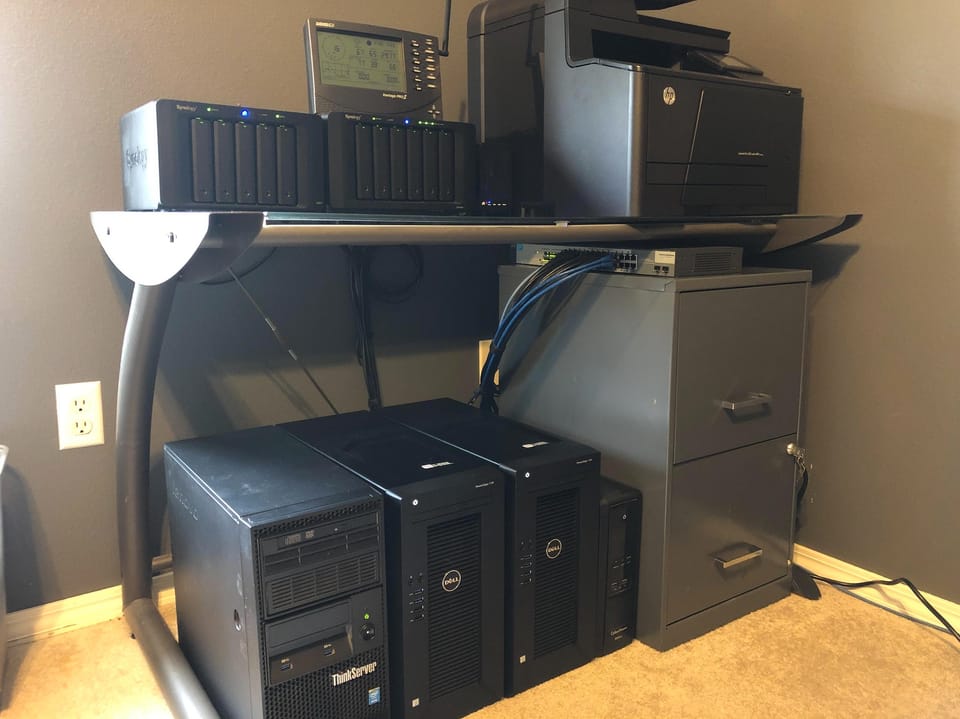
Used enterprise servers can be a cost-effective option, as they offer a lot of computing power and features for a fraction of the price of new equipment. However, they can also be noisy and power-hungry, so it's important to do your research before buying.
Essential Components of a Home Lab
Regardless of the specific setup you choose, there are some essential components that every home lab should have:
Hardware Considerations
- Processing power: The amount of CPU cores and clock speed needed will depend on the types of projects you plan to run.
- Memory: RAM is essential for running virtual machines and other memory-intensive applications.
- Storage: You'll need enough storage space to store your operating systems, applications, and data.
- Networking equipment: A router and switch are essential for connecting your home lab devices to your network.
Software Infrastructure
- Hypervisor: A hypervisor is a software that allows you to run multiple virtual machines on a single physical machine.
- Operating systems: You'll need operating systems for your virtual machines and physical servers.
- Container platforms: Container platforms like Docker and Kubernetes allow you to run applications in isolated containers.
- Management tools: Management tools can help you monitor and manage your home lab resources.
Popular Home Lab Projects and Applications
One of the most exciting aspects of building a home lab is the opportunity to experiment with different projects and applications. Here are some popular home lab projects to get you started:
Self-Hosted Services
- Media servers: Stream your favorite movies and TV shows with Plex or Jellyfin.
- File sharing: Share files across your network with Nextcloud or ownCloud.
- Web hosting: Host your own website or blog with WordPress or Ghost.
- Game servers: Set up a Minecraft or Team Fortress 2 server for you and your friends.
Learning Opportunities
- Networking fundamentals: Learn about IP addressing, routing, and network security.
- System administration: Gain experience with Linux and Windows server administration.
- Security testing: Test your network security with tools like Metasploit and Nmap.
- Containerization: Learn how to use Docker and Kubernetes to deploy and manage applications.
Best Practices and Common Pitfalls
To ensure that your home lab is reliable, secure, and easy to manage, it's important to follow some best practices:
Setting Up Your Environment
- Space considerations: Choose a location for your home lab that has enough space for your equipment.
- Power management: Use a power strip or UPS to protect your equipment from power surges.
- Cooling requirements: Make sure your equipment has adequate cooling to prevent overheating.
- Noise mitigation: If your home lab is located in a living area, consider using noise-dampening materials to reduce noise.
Maintenance and Growth
- Backup strategies: Regularly back up your data to prevent data loss.
- Upgrade paths: Plan for future upgrades to keep your home lab up-to-date.
- Resource monitoring: Monitor your home lab resources to identify potential problems.
- Documentation importance: Keep detailed documentation of your home lab configuration.
Future-Proofing Your Home Lab
As technology continues to evolve, it's important to future-proof your home lab to ensure that it remains relevant and useful.
Scalability Considerations
- Expansion planning: Plan for future expansion to accommodate new projects and applications.
- Hardware upgrades: Upgrade your hardware as needed to keep up with the demands of your projects.
- Network growth: Expand your network infrastructure to support more devices and users.
- Storage scaling: Add more storage capacity as your data grows.
Emerging Technologies
- Container orchestration: Learn how to use Kubernetes to orchestrate your containers.
- Automation tools: Use automation tools like Ansible and Puppet to automate tasks.
- Cloud integration: Integrate your home lab with cloud services like AWS and Azure.
- New hardware platforms: Keep an eye on new hardware platforms like ARM servers and edge computing devices.
Conclusion
Building a home lab is a rewarding experience that can open up a world of opportunities for learning, experimentation, and personal growth. As Techno Tim emphasizes, the possibilities are endless, and the only limit is your imagination.
To get started, take some time to define your goals and choose a setup that fits your budget and technical expertise. Whether you start with a virtual home lab, a repurposed computer, or enterprise-grade hardware, the key is to start experimenting and learning.
Join the vibrant home lab community online to connect with other enthusiasts, share your experiences, and get help with your projects. With dedication and a willingness to learn, you can build a powerful and versatile home lab that will serve you well for years to come.
Comments ()